
AI Rap Video Credits Explained: Packs, Subscriptions and Generation Costs
Understand the video quote, top up a short balance without subscribing, and compare one-time credit packs with recurring plans. No free generation allowance is included.
AI RAP VIDEO uses paid credits for generation. Creating an account does not currently include a free generation allowance. If you only want to make one video, you can choose a one-time credit pack when checkout is available; a subscription is not required. If purchasing is unavailable on the pricing page, you cannot complete a top-up yet.
The important number is the quote for your selected video, not the name of the pack you buy.
Check the video cost first
Open Pick quality & length in the studio. Choose the model, resolution and duration you want, then read This video. A model name is not a fixed price for every possible setting.
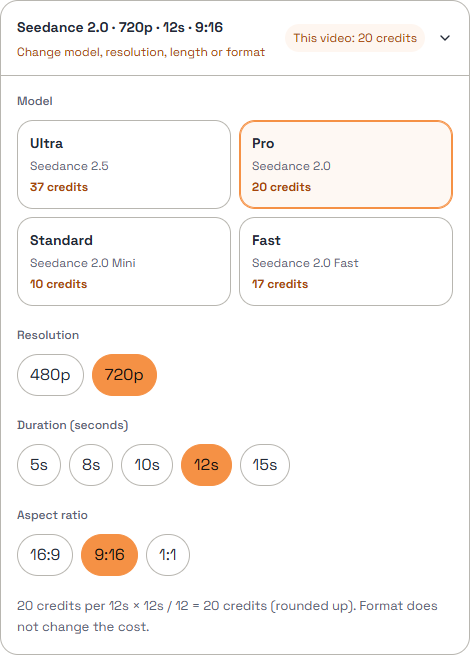
Actual studio interface captured on October 30, 2026. The selected 720p, 12-second video costs 20 credits in this example. Use the live quote for your purchase decision.
What if you have 10 credits but the video costs 20?
You need another 10 usable credits before submitting that request. You have two choices:
- Keep the selected model and settings, and buy a pack that brings your balance to at least 20 credits.
- Choose a lower-cost combination shown in the studio and check its new quote.
Buying a pack does not lock its credits to one model. Under the site's current credit-based access, your usable balance must cover the request for an available model and compatible scene or effect. The required photos and other inputs must also be valid. You do not need to subscribe just to choose a more expensive model.
If the available pack adds more than the missing 10 credits, the remainder stays in your balance after generation, subject to those credits' expiry terms.
One-time packs and subscriptions
A credit pack is a one-time purchase. It is useful when you have a particular video in mind or need to top up an existing balance.
A subscription is a recurring purchase with the credits and billing terms shown for that plan. Compare the total checkout amount, credit allowance and billing interval. Do not assume a yearly option grants twelve times the monthly credits, or that a monthly equivalent is the amount charged today.
Before paying, check the current pricing page for the included credits, displayed price and whether you are choosing a one-time pack or a monthly or yearly subscription. Confirm the total charge and recurring-payment terms at checkout.
Credit packs show their validity on the pricing card. A subscription's billing interval is not, by itself, a statement of the credits' expiry date. If the subscription credit validity is not stated, clarify it through support before purchasing; do not assume those credits last forever.
A pack name such as "Single" is not a promise of one generation at every quality level. Divide the usable credits by the quote for the video you actually want. For example, 10 credits cannot cover a request quoted at 20.
Leave room for another attempt only if you want one
A completed generation may still contain a detail you dislike. A new request needs its own quote and credits, so do not budget as though retries are automatically free.
Check My videos before submitting again if a task has not finished. A processing task is different from a failed task, and neither is the same as a completed clip you want to change.
Credits do not tell you everything about the result
The credit quote covers the generation request. It is not evidence of perfect lip sync, a particular likeness, commercial permission, or a watermark policy. Review the finished video and the applicable product terms rather than inferring those conditions from a model or package name.